

We’re excited to have MemberSports as the official tee sheet partner of the Western Washington PGA. All WWCPGA Pro-Am tee sheets are hosted on the MemberSports platform.
Cart Selection
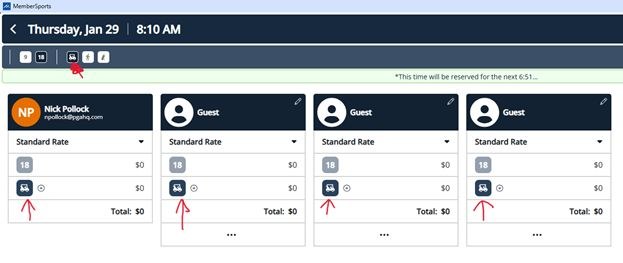
- You will not see a cart number next to your name
- Each tee time includes 4 players total (you + 3 guests)
- You must select Walking or Riding for each player
How carts are counted:
- 1–2 riders = 1 cart reserved
- 3–4 riders = 2 carts reserved
Please be intentional with walking/riding selections, this is how we manage cart availability!
Example (2 carts reserved):
👥 Player Names
- Bookings should always be your name + 3 guests
- Please do not enter amateur names or information on the registration page
📍 Booking Location (Very Important)
- Do not use “Find a Course” in the app
- All WWCPGA tee times must be booked and viewed through
Western Washington Chapter (WA)
(this is the “course” name in MemberSports)
📅 Event Names in Reservations (Temporary)
- You may currently see only “Western Washington Chapter” and a date under your reservations
- Please reference:
- The WWCPGA PDF Event Calendar, or
- The Club Calendar
We are actively working on improvements and will be rolling out multiple upgrades over the coming months to make this platform more streamlined and intuitive.
HOW TO USE MEMBERSPORTS
Step 1: Log In
- Visit https://app.membersports.com/home
- Click Login and enter your MemberSports credentials
- Email: Your email address where you receive Chapter communications
- A temporary password was emailed to you. If it expired, or you don’t have it, click the “forgot password” button. Please update your password!
Step 2: Select the Correct “Golf Club”
- Click the Search Golf Club field
- Select Western Washington Chapter (WA)
- Click Update
This ensures you are viewing WWCPGA tee times and reservations. This should also be found under your favorites.
To Book a Tee Time
- Click Book Tee Time in the left-hand menu
- Click the Calendar and select your desired date
- Scroll to find an available tee time
- Click BOOK THIS TIME
- Confirm:
- Player names (you + 3 guests – DO NOT ENTER GUEST NAMES)
- Walking or riding selection for each player
- Click Book Tee Time to confirm
Your booking will then appear under My Reservations.
To View or Cancel a Tee Time
- Click My Reservations
- Locate your scheduled tee time
- Click Edit
- Select Delete Booking
- Confirm by clicking Delete Booking again
⚠️ Deleted bookings cannot be undone.
If you have questions, please don’t hesitate to reach out.
Thank you,
Nick Pollock, PGA
Executive Director
Western Washington Chapter PGA